NL
NEC logo
Officiële handleiding

NEC X462UN

10 pagina's·1.7 MB·Auto-videosysteem·PDF·EN
NEC X462UN
Inhoudsopgave 2 secties Quad Dimensions with Optional Wall Mount Kit (WM-46UN-2x2) · Input Panel (Bottom) Input Panel (Side) TonenVerbergen
Page 1 of the NEC X462UN user manual
Pagina 1 · klik om te vergroten
Pagina 1

NEC Display Solutions of America, Inc. X462UN Installation Guide 46” LCD Display Rev 1.0

NEC X462UN diagram (page 1)
Afb. 1
  • Contents Product Description and Notes Page 1 Tilt Angle and Rotation Page 1 Ventilation Requirements Page 2 Display Dimensions Front and all Sides Page 3 Bottom Page 4 Optional Wall Mount Dimensions (WMK-3257) Page 5 Quad Configuration Resolution Page 6 Quad Dimensions with Optional Wall Mount Kit Page 7 Optional Wall Mount Kit Dimensions (WM-46UN-2x2) Page 8 Input Panel Page 9 Control Codes Page 10 Product Description Type: LCD Display Screen Surface: Anti-Reflective Resolution: 1366 x 768 Dimensions: 40.4”(W) x 22.8”(H) x 5.0”(D) Quad Resolution: 1920 x 1080 Quad Dimensions: 80.7”(W) x 45.6”(H) x 5.0”(D) Aspect Ratio: 16:9 Weight: 64.6 lbs FCC: Class B Quad Weight: 258.4 lbs Power Consumption: 330W (max) BTU’s: 1127 BTU/hour Quad Power Consumption: 1320W (max) Quad BTU’s: 4508 BTU/hour NOTES:
  • This document is intended to be used as a reference guide to supply useful information for a design or installation. It is not intended to be a step-by step procedure for installation.
  • Any ceilings or walls must be strong enough to support the monitor and the installation must be in accordance with any local building codes. All mounts should make secure contact to wood studs.
  • 4:3 sources can be displayed on the 16:9 screen in either normal aspect ratio with bars on the left or right, or stretched horizontally to fill the screen using the menus (see “Aspect Modes” in menus and user manual).
  • Distances are in inches, for millimeters multiply by 25.4.
  • Distances may vary ±5%. Tilt Angle and Rotation Below are the maximum angles that the monitor can be tilted in the landscape position only. Landscape 20deg
NEC X462UN diagram (page 1)
Afb. 2
NEC X462UN diagram (page 1)
Afb. 3
Page 2 of the NEC X462UN user manual
Pagina 2 · klik om te vergroten
Pagina 2

NEC Display Solutions of America, Inc. X462UN Installation Guide 46” LCD Display Rev 1.0

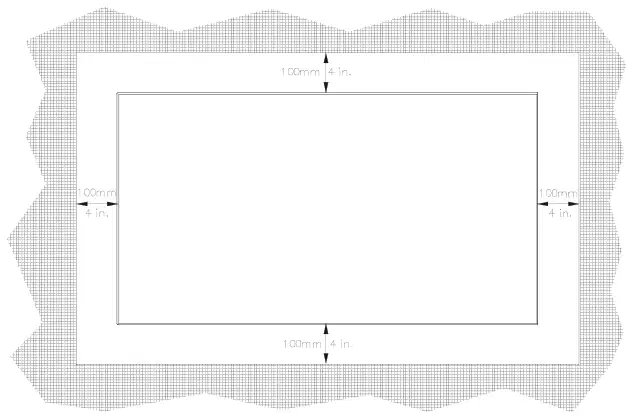
Ventilation Requirements (all models) Dimensions below are minimum required for proper ventilation. NOTE: • The ventilation space should not be covered or closed off at the front of the opening. If for some reason the opening needs to be covered, other means of ventilation will need to be incorporated into the design. Contact NEC for design review and recommendations.

NEC X462UN diagram (page 2)
Afb. 4
NEC X462UN diagram (page 2)
Afb. 5
Page 3 of the NEC X462UN user manual
Pagina 3 · klik om te vergroten
Pagina 3

NEC Display Solutions of America, Inc. X462UN Installation Guide 46” LCD Display Rev 1.0

NEC X462UN diagram (page 3)
Afb. 6
Page 4 of the NEC X462UN user manual
Pagina 4 · klik om te vergroten
Pagina 4

NEC Display Solutions of America, Inc. X462UN Installation Guide 46” LCD Display Rev 1.0

NEC X462UN diagram (page 4)
Afb. 7
Page 5 of the NEC X462UN user manual
Pagina 5 · klik om te vergroten
Pagina 5

NEC Display Solutions of America, Inc. X462UN Installation Guide 46” LCD Display Rev 1.0

NEC X462UN diagram (page 5)
Afb. 8
NEC X462UN diagram (page 5)
Afb. 9
Page 6 of the NEC X462UN user manual
Pagina 6 · klik om te vergroten
Pagina 6

NEC Display Solutions of America, Inc. X462UN Installation Guide 46” LCD Display Rev 1.0

NEC X462UN diagram (page 6)
Afb. 10
1366 x 7681366 x 768 1366 x 7681366 x 768
Page 7 of the NEC X462UN user manual — Quad Dimensions with Optional Wall Mount Kit (WM-46UN-2x2)
Pagina 7 · klik om te vergroten
Pagina 7

NEC Display Solutions of America, Inc. X462UN Installation Guide 46” LCD Display Rev 1.0

Quad Dimensions with Optional Wall Mount Kit (WM-46UN-2x2)

NEC X462UN — Quad Dimensions with Optional Wall Mount Kit (WM-46UN-2x2) diagram (page 7)
Afb. 11 · Quad Dimensions with Optional Wall Mount Kit (WM-46U…
Page 8 of the NEC X462UN user manual — Quad Dimensions with Optional Wall Mount Kit (WM-46UN-2x2)
Pagina 8 · klik om te vergroten
Pagina 8

NEC Display Solutions of America, Inc. X462UN Installation Guide 46” LCD Display Rev 1.0

NEC X462UN — Quad Dimensions with Optional Wall Mount Kit (WM-46UN-2x2) diagram (page 8)
Afb. 12 · Quad Dimensions with Optional Wall Mount Kit (WM-46U…
NEC X462UN — Quad Dimensions with Optional Wall Mount Kit (WM-46UN-2x2) diagram (page 8)
Afb. 13 · Quad Dimensions with Optional Wall Mount Kit (WM-46U…
Page 9 of the NEC X462UN user manual — Input Panel (Bottom) Input Panel (Side)
Pagina 9 · klik om te vergroten
Pagina 9

NEC Display Solutions of America, Inc. X462UN Installation Guide 46” LCD Display Rev 1.0

Input Panel (Bottom) Input Panel (Side)

NEC X462UN — Input Panel (Bottom) Input Panel (Side) diagram (page 9)
Afb. 14 · Input Panel (Bottom) Input Panel (Side)
NEC X462UN — Input Panel (Bottom) Input Panel (Side) diagram (page 9)
Afb. 15 · Input Panel (Bottom) Input Panel (Side)
Page 10 of the NEC X462UN user manual — Input Panel (Bottom) Input Panel (Side)
Pagina 10 · klik om te vergroten
Pagina 10

NEC Display Solutions of America, Inc. X462UN Installation Guide 46” LCD Display Rev 1.0

Control Codes Function Code Data POWER ON 01 30 41 30 41 30 43 02 43 32 30 33 44 36 30 30 30 31 03 73 0D OFF 01 30 41 30 41 30 43 02 43 32 30 33 44 36 30 30 30 34 03 76 0D INPUT SWITCH VGA (15pin HD) 01 30 41 30 45 30 41 02 30 30 36 30 31 03 73 0D RGBHV 01 30 41 30 45 30 41 02 30 30 36 30 32 03 70 0D DVI 01 30 41 30 45 30 41 02 30 30 36 30 33 03 71 0D HDMI 01 30 41 30 45 30 41 02 30 30 36 30 34 03 76 0D VIDEO (Composite) 01 30 41 30 45 30 41 02 30 30 36 30 35 03 77 0D DVD/HD 01 30 41 30 45 30 41 02 30 30 36 30 43 03 01 0D S-Video 01 30 41 30 45 30 41 02 30 30 36 30 37 03 75 0D TV (Analog) 01 30 41 30 45 30 41 02 30 30 36 30 39 03 7B 0D TV (Digital) 01 30 41 30 45 30 41 02 30 30 36 30 41 03 03 0D Option 01 30 41 30 45 30 41 02 30 30 36 30 44 03 06 0D DisplayPort 01 30 41 30 45 30 41 02 30 30 36 30 46 03 04 0D AUDIO MUTE ON 01 30 41 30 45 30 41 02 30 30 38 44 30 30 30 31 03 09 0D OFF 01 30 41 30 45 30 41 02 30 30 38 44 30 30 30 32 03 0A 0D PICTURE MODE sRGB 01 30 41 30 45 30 41 02 30 32 31 41 30 30 30 31 03 07 0D HIBRIGHT 01 30 41 30 45 30 41 02 30 32 31 41 30 30 30 33 03 05 0D STANDARD 01 30 41 30 45 30 41 02 30 32 31 41 30 30 30 34 03 02 0D CINEMA 01 30 41 30 45 30 41 02 30 32 31 41 30 30 30 35 03 03 0D SCREEN MODE: NORMAL 01 30 41 30 45 30 41 02 30 32 37 30 31 03 70 0D FULL 01 30 41 30 45 30 41 02 30 32 37 30 32 03 73 0D WIDE 01 30 41 30 45 30 41 02 30 32 37 30 33 03 72 0D ZOOM 01 30 41 30 45 30 41 02 30 32 37 30 34 03 75 0D AUTO SETUP EXECUTE 01 30 41 30 45 30 41 02 30 30 31 45 30 30 30 31 03 01 0D FILM MODE OFF 01 30 41 30 45 30 41 02 30 30 30 32 30 30 30 31 03 77 0D AUTO 01 30 41 30 45 30 41 02 30 30 30 32 30 30 30 32 03 74 0D NOTE: Contact your NEC rep for codes not listed. NOTE: Use a cross/reverse/null modem cable. Cable Connection Communication Protocol: Interface: RS-232C LAN Communication: Asynchronous Communication speed: Auto setting (10/100Mbps) Baud Rate: 9600 bps Certified standard: IEEE802.3 (10BASE-T) Data Length: 8 bits IEEE802.3u (100BASE-TX, Auto-Negotiation) Parity: None Stop Bit: 1 bit Communication Code: Hex PC Control Connector (D-Sub 9P)

NEC X462UN — Input Panel (Bottom) Input Panel (Side) diagram (page 10)
Afb. 16 · Input Panel (Bottom) Input Panel (Side)

Transmit Data+ Transmit Data- Receive Data+

Not Used Not Used

Not Used Not Used

Receive Data-

Vraag stellen over de NEC X462UN

Eigenaren en ons team reageren doorgaans binnen een dag — en uw vraag helpt ook de volgende persoon.

Add your email to get notified when it’s answered — no spam, ever.

0 questions
Nog geen vragen over de NEC X462UN

Stel als eerste een vraag — andere eigenaren of ons team geven antwoord.

Origineel document

NEC X462UN handleiding-pdf

10 pagina's·1.7 MB·Auto-videosysteem·PDF
Klik op een bovenstaande pagina om deze hier te openen
Pagina 1 / …
100%
Pagina's laden…