



Touching the internal parts of the camera or lens could result in injury. Repairs should be performed only by qualified technicians. Should the camera or lens break open as the result of a fall or other accident, take the product to a Nikon- authorized service representative for inspection after unplugging the product and/or removing the battery.
Turn off immediately in the event of malfunction
Should you notice smoke or an unusual smell coming from the camera or lens, remove the battery immediately, taking care to avoid burns. Continued operation could result in injury. After removing or disconnecting the power source, take the product to a Nikon- authorized service representative for inspection.
Do not use the camera or lens in the presence of flammable gas
Operating electronic equipment in the presence of flammable gas could result in an explosion or fire.
Do not look at the sun through the lens or viewfinder
Viewing the sun or other strong light sources through the lens or viewfinder could cause permanent visual impairment.
Keep out of reach of children
Particular care should be taken to prevent infants from putting the batteries or other small parts into their mouths.

Observe the following precautions when handling the camera and lens

Thank you for purchasing the AF-S NIKKOR 200-400mm f/4G ED VRⅡ lens. Before using this lens, please read these instructions and refer to your camera's user's manual.

1 Lens hood (P. 25) 2 Lens hood screw (P. 25) 3 Lens protective glass (attached to the lens) (P. 26) 4 Rubber grip 5 Focus operation button (Focus Lock/ Memory recall/AF Start) (P. 22) 6 Focus ring (P. 21) 7 Distance scale (P. 25) 8 Distance index line 9 Zoom ring (P. 25) ! Focal length scale " Focal length scale index line # Lens rotating position index (P. 25) $ Tripod collar ring fastening screw
& Slip-in filter holder knob (P. 26) ( Memory set button (P. 22) ) Mounting index ~ Lens mount rubber gasket (P. 28) + CPU contacts (P. 28) , Built-in rotating tripod collar (P. 25) - Strap eyelet . Sound monitor switch (P. 22) / Focus operation selection switch
(AF-L/MEMORY RECALL/AF-ON) (P. 22) : Focus mode switch (P. 21) ; Focusing limit switch (P. 21) < Vibration reduction ON/OFF switch
(P. 24) = Vibration reduction mode switch
(P. 25) % Slip-in filter holder (P. 26)


Nikon digital SLR (Nikon FX/DX format) cameras, F6, F5, F100, F80-Series/ N80-Series*, F75-Series/N75-Series*, F65-Series/N65-Series*
✓
Pronea 600i/6i*, Pronea S*2 — ✓
F4-Series, F90X/N90s*, F90-Series/ N90*, F70-Series/N70* — ✓*3 ✓ ✓*4 ✓*3
— ✓
F-801s/N8008s*, F-801/N8008*, F-601M/N6000* — ✓ ✓ — —
F3AF, F-601/N6006*, F-501/N2020**, Nikon MF cameras (except F-601M/ N6000*)
—
✓: Possible —: Not possible VR: Vibration reduction AF: Autofocus *Sold exclusively in the USA **Sold exclusively in the USA and Canada *1: P includes AUTO and Vari-Program System (Scene modes). *2: Manual (M) is not available. *3: When the focus operation selection switch is set to AF-ON, autofocus begins as soon as the focus operation button is pressed while the shutter-release button pressed halfway.

*4: Press the memory set button or a focus operation button while pressing the shutter release button halfway. *5: Possible, with limited restrictions ■ Focusing Set your camera’s focus mode according to the chart below:

Nikon digital SLR (Nikon FX/DX format) cameras, F6, F5, F4-Series, F100, F90X/N90s*, F90-Series/N90*, F80-Series/N80-Series*, F75-Series/N75-Series*, F70-Series/N70*, F65-Series/N65-Series*, Pronea 600i/6i*, Pronea S
F60-Series/N60*, F55-Series/N55-Series*, F50-Series/N50*, F-801s/N8008s*, F-801/N8008*, F-601M/N6000*, F-401x/N5005*, F-401s/N4004s*, F-401/N4004*
*Sold exclusively in the USA AF: Autofocus MF: Manual focus
A/M (Autofocus with manual override. AF priority) mode and M/A (Autofocus with manual override. MF priority) mode
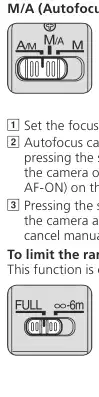
the focus ring, but focus ring detection sensitivity is lower than in M/A mode. Use this mode to avoid canceling the AF setting by unintentionally moving the focus ring.
1 Set the focus mode switch to A/M or M/A. 2 Autofocus can be manually overridden by rotating the focus ring while pressing the shutter release button halfway, pressing the AF-ON button on the camera or pressing a focus operation button (with focus operation set to AF-ON) on the lens. 3 Pressing the shutter release button halfway, pressing the AF-ON button on the camera again or pressing a focus operation button on the lens again will cancel manual override and return the lens to autofocus mode. To limit the range of autofocus This function is only available with autofocus.
FULL: If the subject is sometimes closer than 6 m (19.7 ft.), set the switch to FULL. ∞–6m: If the subject is always 6 m (19.7 ft.) or more away, set
the switch to ∞– 6m to reduce focusing time.

button (See p. 20 for compatible cameras.) Use the focus operation selection switch to choose a function of the focus operation buttons.

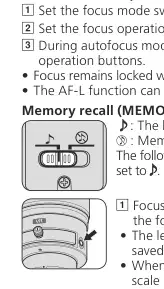
: The lens beeps when memory recall is operated. ♪ ○ : Memory recall operates without the beep sound. The following operation is with the sound monitor switch set to .
1 Focus on a subject and press the memory set button to save the focus distance. • The lens will beep when the focused distance is correctly
saved. • When the focus distance is not correctly saved, the distance

Number of vibrations Low High
Vibration reduction using a tripod
Strong camera shake when
taking pictures from a moving
Strength of vibrations Strong Weak
Set the vibration reduction mode switch to NORMAL.
Set the vibration reduction mode switch to ACTIVE.
When taking pictures When taking panning shots When taking pictures from a moving vehicle When taking pictures using a tripod
Set the vibration reduction mode switch to either NORMAL or ACTIVE. Set the vibration reduction mode switch to NORMAL.
Set the vibration reduction mode switch to ACTIVE.
Set the vibration reduction mode switch to either NORMAL or ACTIVE.
Camera shake · vehicle · Panning shots


Setting the vibration reduction ON/OFF switch
shutter-release button is pressed halfway and also at the instant the shutter is released. Because vibration is reduced in the viewfinder, auto/manual focusing and exact framing of the subject are easier. OFF: The effects of camera shake are not reduced. Setting the vibration reduction mode switch Set the vibration reduction ON/OFF switch to ON and choose a vibration reduction mode with the vibration reduction mode switch.




Cameras Supported focal length/Shooting distance
D5000, D3000, D60, D40-Series
Vignetting occurs at any shooting distance.
*Sold exclusively in the USA ■ Slip-in filter holder Always use a (52mm screw-on) filter. A 52mm Screw-on NC Filter is attached to the filter holder when shipped from the factory.
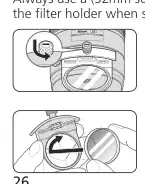
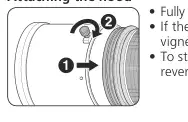
1 Press down on the slip-in filter holder knob, and turn counterclockwise until the white line on the knob is at a right angle to the axis of the lens. 2 Pull the slip-in filter holder from the lens body 3 Detach the attached filter from the filter holder.
4 Screw a filter onto the side of the filter holder marked with the words “Nikon” and “JAPAN”. • The slip-in filter holder can be attached with the “Nikon” and “JAPAN” facing either the lens or camera side without any effect on your pictures.
D70-Series · F80-Series/N80-Series* · F75-Series/N75-Series*, F70-Series/N70*


F6 ◎ (–0.5) ◎ — ◎ — ◎ — ◎ (–0.5) — ◎
F5+DP-30 ◎ ◎ ○ ◎ ◎ — ○ ◎ — ◎ — ◎
F5+DA-30 ◎ ◎ ○ ◎ ◎ — ○ ◎ — ◎ — ◎
◎ : Excellent focusing ○ : Acceptable focusing Slight vignetting or moiré patterns appear in the viewfinder, but not on the film. — : Not available ( ) : Indicates degree of exposure compensation needed (center-weighted
metering only). For F6 cameras, compensate by selecting “Other screen“ in Custom Setting “b6: Screen comp.“ and setting the EV level to -2.0 to +2.0 in 0.5 EV steps. When using screens other than type B or E, “Other screen“ must be selected even when the required compensation value is “0“ (no compensation required). For F5 cameras, compensate using Custom Setting #18 on the camera body. See user’s manual of the camera body for more details. Blank box means not applicable. Since type M screen can be used for both macrophotography at a magnification ratio of 1:1 or above and for photomicrography, it has different applications than other screens. Important • For F5 cameras, only EC-B, EC-E, B, E, J, A, L focusing screens are usable in Matrix Metering.


Lens construction: 24 elements in 17 groups (4 ED and some Nano Crystal Coat-deposited lens elements), as well as 1 detachable protective glass Picture angle: 12°20´-6°10´ with 35mm (135) format Nikon film SLR cameras and Nikon FX format digital SLR cameras 8°-4° with Nikon DX format digital SLR cameras 9°50´-5° with IX240 system cameras Focal length scale: 200, 250, 300, 350, 400mm Distance information: Output to camera
Focusing: Nikon Internal Focusing (IF) system, autofocus using a Silent Wave Motor; manually via separate focus ring Vibration reduction: Lens-shift method using voice coil motors (VCMs)
Shooting distance scale:
Graduated in meters and feet from 2 m (7 ft) to infinity (∞) Closest focusing distance:
2 m (6.6 ft.) with autofocus, at all zoom settings 1.95 m (6.4 ft.) with manual focus, at all zoom settings No. of diaphragm blades:
9 pcs. (rounded)
Exposure measurement:
Via full-aperture method with cameras with CPU interface system Focusing limit switch: Provided; two ranges available: FULL (∞–2 m), or ∞–6 m
Tripod collar: Rotatable through 360°, lens rotating position index at 90°, only tripod collar detachable Dimensions: Approx. 124 mm dia. x 365.5 mm extension from the camera’s lens-mount flange with lens protective glass attached Approx. 124 mm dia. x 358.5 mm extension from the camera’s lens-mount flange without lens protective glass Weight: Approx. 3,360 g (7.4 lbs) with lens protective glass Approx. 3,240 g (7.1 lbs) without lens protective glass
Specifications and designs are subject to change without any notice or obligation on the part of the manufacturer.
Eigenaren en ons team reageren doorgaans binnen een dag — en uw vraag helpt ook de volgende persoon.
Stel als eerste een vraag — andere eigenaren of ons team geven antwoord.