



FR

NL
ES
IT
F1DF102Uea Quick Installation Guide

Congratulations and thank you for purchasing Switch2. Switch2 is easy to set up and use, and comes with everything you need to share one monitor, keyboard, and mouse between your two computers. No additional cables or software are required.
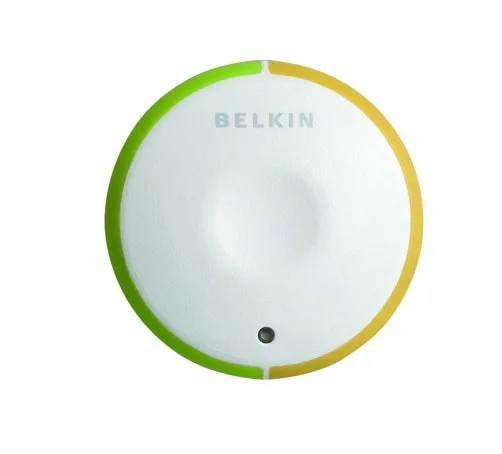
The diagram below shows a typical Switch2 setup. The remote sits on your desk and connects—along with your monitor, keyboard, and mouse—to the cable base. The base is connected to your two computers using the attached cables.
Package Contents/Introduction | 1
base with cables · remote

Switch2 supports any LCD or CRT monitor with a VGA connection. You can also use your DVI monitor with Switch2 by connecting a VGA adapter to the DVI cable. Switch2 does not support direct DVI connections from monitors.
Keyboard/Mouse Switch2 supports any keyboard and mouse with a USB connection.
Switch2 can be used with any PC or Mac® desktop or notebook computer that supports USB keyboard and mouse connections, and that runs on one of these operating systems:
System Requirements | 2

Before you begin, make sure that your USB keyboard and mouse work properly with both computers.

Switch2 Tip: You can use the included fastener strip to attach the remote to your monitor, keyboard, or other desk item.
Installing your Switch2 | 3

You are now ready to use your Switch2.
Switch2 Tip: Keep the base behind your computers to keep your desk free of cable clutter. Installing your Switch2 | 4

When you power on your computers, your first computer’s desktop will appear on your monitor. You are now ready to use that computer as if it were directly connected to your monitor, keyboard, and mouse.
To switch access to your other computer, simply press the remote. Your other computer’s desktop will appear on your monitor. You are now ready to use your other computer as if it were directly connected to your monitor, keyboard, and mouse. Press the remote each time you want to switch access from one computer to the other.
Using your Switch2 | 5

FR

NL
ES
IT
Guide d’installation rapide
F1DF102Uea

DECLARATION OF CONFORMITY WITH FCC RULES FOR ELECTROMAGNETIC COMPATIBILITY We, Belkin Corporation, of 501 West Walnut Street, Compton CA 90220, declare under our sole responsibility that the product F1DF102U, to which this declaration relates: Complies with Part 15 of the FCC Rules. Operation is subject to the following two conditions: (1) this device may not cause harmful interference, and (2) this device must accept any interference received, including interference that may cause undesired operation.
CE Declaration of Conformity We, Belkin Corporation, declare under our sole responsibility that the F1DF102U, to which this declaration relates, is in conformity with Emissions Standard EN55022 and with Immunity Standard EN55024, LVP EN61000-3-2, and EN61000-3-3.
ICES This Class B digital apparatus complies with Canadian ICES-003. Cet appareil numérique de la classe B est conforme á la norme NMB-003 du Canada. Belkin Corporation Limited 3-Year Product Warranty
What this warranty covers. Belkin Corporation warrants to the original purchaser of this Belkin product that the product shall be free of defects in design, assembly, material, or workmanship.
What the period of coverage is. Belkin Corporation warrants the Belkin product for three years.
What will we do to correct problems? Product Warranty. Belkin will repair or replace, at its option, any defective product free of charge (except for shipping charges for the product).
What is not covered by this warranty? All above warranties are null and void if the Belkin product is not provided to Belkin Corporation for inspection upon Belkin’s request at the sole expense of the purchaser, or if Belkin Corporation determines that the Belkin product has been improperly installed, altered in any way, or tampered with. The Belkin Product Warranty does not protect against acts of God (other than lightning) such as flood, earthquake, war, vandalism, theft, normal-use wear and tear, erosion, depletion, obsolescence, abuse, damage due to low voltage disturbances (i.e. brownouts or sags), non-authorized program, or system equipment modification or alteration.
Information | I

How to get service. To get service for your Belkin product you must take the following steps: 1. Contact Belkin Ltd., Express Business Park, Shipton Way, Rushden, NN10 6GL, United Kingdom, Attn: Customer Service, or call +44 (0) 1933 35 2000, within 15 days of the Occurrence. Be prepared to provide the following information: a. The part number of the Belkin product. b. Where you purchased the product. c. When you purchased the product. d. Copy of original receipt.
Belkin Corporation reserves the right to review the damaged Belkin product. All costs of shipping the Belkin product to Belkin Corporation for inspection shall be borne solely by the purchaser. If Belkin determines, in its sole discretion, that it is impractical to ship the damaged equipment to Belkin Corporation, Belkin may designate, in its sole discretion, an equipment repair facility to inspect and estimate the cost to repair such equipment. The cost, if any, of shipping the equipment to and from such repair facility and of such estimate shall be borne solely by the purchaser. Damaged equipment must remain available for inspection until the claim is finalized. Whenever claims are settled, Belkin Corporation reserves the right to be subrogated under any existing insurance policies the purchaser may have.
How state law relates to the warranty. THIS WARRANTY CONTAINS THE SOLE WARRANTY OF BELKIN CORPORATION, THERE ARE NO OTHER WARRANTIES, EXPRESSED OR, EXCEPT AS REQUIRED BY LAW, IMPLIED, INCLUDING THE IMPLIED WARRANTY OR CONDITION OF QUALITY, MERCHANTABILITY OR FITNESS FOR A PARTICULAR PURPOSE, AND SUCH IMPLIED WARRANTIES, IF ANY, ARE LIMITED IN DURATION TO THE TERM OF THIS WARRANTY.
Some states do not allow limitations on how long an implied warranty lasts, so the above limitations may not apply to you.
IN NO EVENT SHALL BELKIN CORPORATION BE LIABLE FOR INCIDENTAL, SPECIAL, DIRECT, INDIRECT, CONSEQUENTIAL OR MULTIPLE DAMAGES SUCH AS, BUT NOT LIMITED TO, LOST BUSINESS OR PROFITS ARISING OUT OF THE SALE OR USE OF ANY BELKIN PRODUCT, EVEN IF ADVISED OF THE POSSIBILITY OF SUCH DAMAGES.
This warranty gives you specific legal rights, and you may also have other rights, which may vary from state to state. Some states do not allow the exclusion or limitation of incidental, consequential, or other damages, so the above limitations may not apply to you.
Information | II

Switch2 Part No.: F1DF102U Computers Supported: 2 Monitors Supported: CRT and LCD (with VGA connector or adapter) Max. Resolution Support: Up to 2048x1536@65Hz Monitor Connection: VGA (HDDB15) Keyboard Input: USB (Type A) Mouse Input: USB (Type A) Stereo Audio Input: 3.5mm jack Switch2 Cable Length: 6 ft. (1.8m) Connector Cable Length: 2 ft., 6 ft. (0.6m, 1.8m) Enclosure: Plastic Switch2 Dimensions: 0.5" (H) x 1.75" (W) (12.7mm x 44.45mm) Switch2 Weight: 370gr Connector Cable Base Dimensions: TBD Connector Cable Base Weight: TBD Operating Temp: 32°–104° F (0°–40° C) Storage Temp: -4°–140° F (-20°–60° C) Humidity: 0–80% RH, non-condensing Warranty: Belkin 3-Year Limited
Information | III

Belkin Corporation 501 West Walnut Street Compton, CA, 90220-5221 USA +1 310 898 1100 +1 310 898 1111 fax
Belkin Ltd. Express Business Park Shipton Way, Rushden NN10 6GL, United Kingdom +44 (0) 1933 35 2000 +44 (0) 1933 31 2000 fax
Belkin B.V. Boeing Avenue 333 1119 PH Schiphol-Rijk, Netherlands +31 (0) 20 654 7300 +31 (0) 20 654 7349 fax
Belkin GmbH Hanebergstrasse 2 80637 Munich, Germany +49 (0) 89 143405 0 +49 (0) 89 143405 100 fax
Belkin SAS 130 rue de Silly 92100 Boulogne-Billancourt, France +33 (0) 1 41 03 14 40 +33 (0) 1 41 31 01 72 fax
Belkin Iberia Avda. Cerro del Aguila 3 28700 San Sebastián de los Reyes, Spain +34 9 16 25 80 00 +34 9 02 02 00 34 fax
Belkin Nordic Knarrarnäsgatan 7 164 40 Kista, Sweden +46 (0) 8 5229 1870 +46 (0) 8 5229 1874 fax
Belkin Tech Support 00 800 223 55 460
© 2006 Belkin Corporation. All rights reserved. All trade names are registered trademarks of respective manufacturers listed. Mac and Mac OS are trademarks of Apple Computer, Inc., registered in the U.S. and other countries.
P75112ea
Eigenaren en ons team reageren doorgaans binnen een dag — en uw vraag helpt ook de volgende persoon.
Stel als eerste een vraag — andere eigenaren of ons team geven antwoord.