


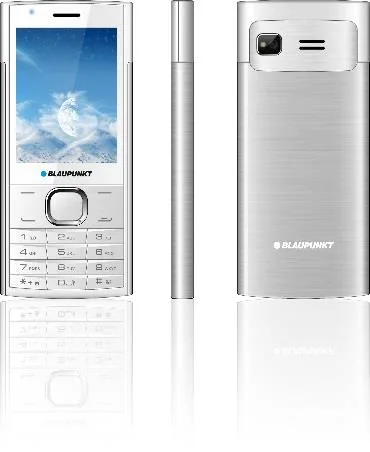



Emergency call Dial 112 in any country in an emergency. Note: Due to the nature of the wireless network, the emergency call is not always guaranteed. Please read the safety instructions carefully, as ignoring it may be dangerous or illegal. The owner of the device is responsible for the use of this appliance. Explosion hazards and restricted areas Turn off the device in explosion hazardous areas. Sparks in such places may lead to an explosion or fire that may result in serious injury or death. Turn off the devicce at gasoline or gas filling stations, especially near the fuel pumps. Follow the instructions strictly in locations such as fuel tanks, chemical plants, and explosive substances. Road safety Observe the local laws and regulations regarding smartphone usage while driving. If you make a phone call while driving, observe the following rules: Focus on driving to become aware of traffic conditions; If the device has a hands-free function, use handsfree. If the traffic situation requires, stop the car before you pick up the phone. Interference Do not switch on the device, where it is prohibited to use a mobile phone or to interfere with radio waves. Qualified service The product can only be repaired by a qualified person. Charger, battery and other accessories Only use a battery, charger and other accessories approved by the manufacturer. Do not connect incompatible products.

Hearing protection To avoid hearing loss, do not listen to music or radio for a long time at high volume. Water resistance The appliance is not waterproof, so keep it dry. Use environment The device complies with the recommended emission values for radio waves when kept at a minimum distance of 1.5 cm from the ear. When carrying the phone in a case, belt clip or holder, make sure that it does not contain metal and that the phone is slightly distracted from the body. When using other accessories, it is not possible to operate in accordance with radio frequency guidelines. If you do not use a case and do not hold the phone on your ear, keep it at least 2.5 cm away from your body, especially during data transfer.
Power Supply Features:

3.1. Insert a SIM card
To use your phone, you need to insert a valid SIM card to connect to the GSM network. To avoid missing or damaged the contents of the SIM card, please DO NOT hold the metal part of the SIM card with your hands free and keep it away from electromagnetic devices. If the SIM card is damaged, it can not be connected to the GSM network. Before inserting or removing the SIM card, make sure that the device is turned off and removed from the back of the device. Note: Locate the SIM card slot on the back of the device and in the direction of the signal, with the collisions slide the card.
3.2. Insert a memory card
The internal memory of the device is 32 MB. You need to insert a memory card to store multiple multimedia files (such as photos, music) or send and receive MMS. The memory card is not part of the basic package. Up to 16GB memory cards can be used. Slide in the memory card with the chip part down in the bay with the memory card slot.
3.3. Insert battery
To insert the battery, slide the back cover down and remove it. Align the gold-colored contacts of the battery with the contacts on the device and gently snap the battery into its place. Replace the back of the device. With the recess on the top two sides of the battery holder, you can unplug the battery if you want to remove it.
3.4. Remove the battery
To remove the battery, turn off the device, remove the cover, and then remove the battery. Note: Please remove the battery when it is switched off, as it may cause abnormal operation.

3.5. Charging the battery
Connect the charger to the appliance and plug the other end into the socket. Flashing the battery icon indicates that charging is in progress. When the flash fades, charging is complete. During charging, the battery and charger may become warm. Charger operating temperature is between 0 ° C and 50 ° C. Do not use if the temperature falls outside this range. For safety reasons, use only the manufacturer's approved charger. Use of an improper charger may result in a warranty..
3.6. Security settings
The PIN code protects the SIM card from an unauthorized user. The PIN is provided by a network service provider, along with a SIM card. Carefully enter a PIN code, after 3 incorrect attempts a SIM card will be locked and an unlock PUK code will be entered. Please contact your service provider for more information. - PUK code
The PUK code is required to unblock the PIN code. The PUK (Personal Unblocking Code) code is provided by the network service provider along with the SIM card. Keep your PUK code in a safe place, do not discard it. If you have lost it, contact your network service provider. If the SIM card is locked, the device asks for a PUK code. You have 10 attempts to enter the correct PUK code, after the incorrect code 10, your SIM card may be permanently locked. Phone password The phone password can be a 4-8-digit code that protects your device from unauthorized use. The factory default password is "1234". When the feature is active, the phone asks for this code every time you turn it on. To protect your privacy, change the default password (Menu> Security> Change Phone Password) as soon as possible. Set a password you can easily remember.
- PIN code

4.1. Power On/Off
Press and hold the Power button to turn on the power. If PIN code is required, enter the PIN code (detailed description in the previous sections). In Standby mode, press and hold the Power button to turn off the device
4.2. Make a call
In Idle mode, enter the phone number with area code, in international format. To correct, press the (right) button. To dial, press the call key or Options> Call. The name and phone number you have dialed are displayed on the screen. As soon as the call is made, a counter is displayed below the phone number, which measures the call time.
4.3. Receive call
To answer a call, press the call key or Answer (left soft key)>. To mute the incoming call, press (right soft key). To reject the call, press (after mute) or end (call end key).
5.1. Names
In Idle mode, enter the phone number and select (left) Options> Add to Names> Add as new name. Select the storage (SIM or phone) where the phone number is saved. Enter contact details: name, phone number. To save, press the Save (Left) soft key. Or: In Menu mode, select Names> Options> New. Select storage space and enter the contact details.

5.2. Camera
In Menu mode, select Camera to open the camera.
5.3. Messaging
Message service is a network-dependent service that allows you to send and receive SMS. For more information, contact your network provider.
SMS sending

You can store received messages on your device or on the SIM card and access it. When you receive a message, a beep or vibration (as previously configured in the menu) will alert you to this, or a graphic will appear on the display. Press the left soft key [View] or OK to view the message, and the right soft key to return to the SMS menu to read other incoming messages.
The Blaupunkt BS 02 is compliant with the essential requirements and relevant provisions of RoHS Directive 2014/53 / EU and 2011/65 / EU. To view the Declaration of Conformity, please contact us at the following e-mail address: info@blaupunkt-mobile.eu
Import: HTM Mobile Kft. 1118 Budapest, Dayka Gábor street 3. HUNGARY For detailed instructions on how to use this product, please visit our website: www.htmmobile.hu or www.blaupunkt.com
MMS sending · Incoming messages


Pagina's waarnaar wordt verwezen in deze handleiding — fabrikant, ondersteuning en downloads.
Eigenaren en ons team reageren doorgaans binnen een dag — en uw vraag helpt ook de volgende persoon.
Stel als eerste een vraag — andere eigenaren of ons team geven antwoord.