NL
THOMSON logo
Officiële handleiding

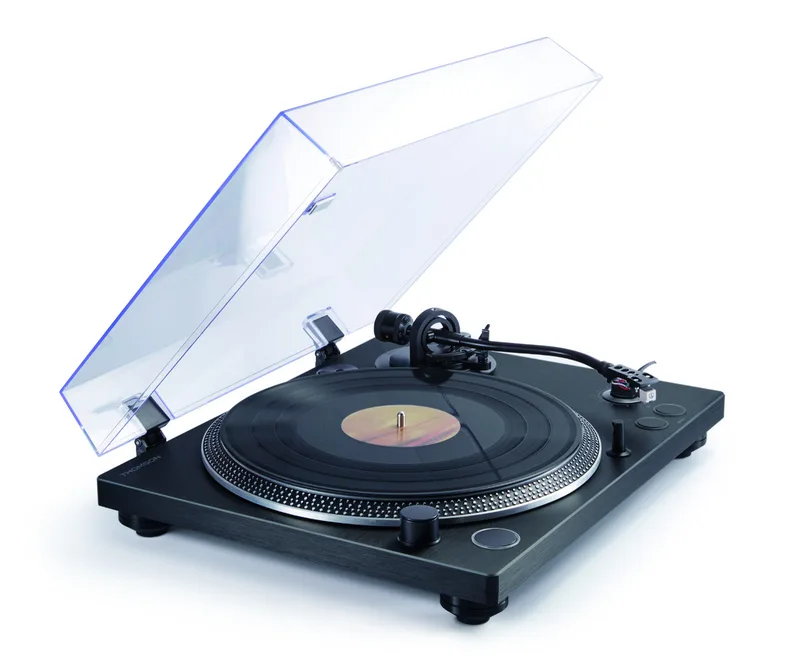
Thomson TT600BT

84 pagina's·2.9 MB·Platenspeler·PDF·ENJA
Thomson TT600BT
Inhoudsopgave 37 secties Contents · Setting Started · Safety and Notice · Care for your product · … TonenVerbergen
Page 2 of the Thomson TT600BT user manual — Care of the environment
Pagina 2 · klik om te vergroten
Pagina 2

13. Refer all servicing to qualified service personnel. Servicing is required when the apparatus has been damaged in anyway, such as power-supply cord or plug is damaged, liquid has been spilled or objects have fallen into the apparatus, apparatus has been exposed to rain or moisture, does not operate normally, or has been dropped. 14. Apparatus shall not be exposed to dripping or splashing. 15. Do not place any sources of danger on the apparatus (e.g. liquid filled objects, lighted candles). 16. Where the MAINS plug or an appliance coupler is used as the disconnect device, the disconnect device shall remain readily operable. 17. Make sure there is enough free space around the product for ventilation. 18. Batteries (battery pack or batteries installed) shall not be exposed to excessive heat such as sunshine, fire or the like.

Care for your product

1. Always unplug the appliance when not in use and before cleaning. 2. Do not play music at excessive volume levels as damage to hearing and or the equipment may occur. 3. Do not use this unit in wet or damp conditions. 4. Always disconnect the unit from the mains power supply before cleaning. Clean the appliance with a soft, damp, lint free cloth. Do not use abrasives or harsh cleaners.

Care of the environment

Your product is designed and manufactured with high quality materials and components, which can be recycled and reused.

Your product contains batteries covered by the European Directive 2006/66/EC, which cannot be disposed with normal household waste. Please inform yourself about the local rules on separate collection of batteries because correct disposal helps to prevent negative consequences for the environmental and human health.

When this crossed-out wheeled bin symbol is attached to a product it means that the product is covered by the European Directive 2002/96/EC. Please inform yourself about the local separate collection system for electrical and electronic products. Please act according to your local rules and do not dispose of your old products with your normal household waste. Correct disposal of your old product helps to prevent potential negative consequences for the environment and human health.

Page 3 of the Thomson TT600BT user manual — Maintenance
Pagina 3 · klik om te vergroten
Pagina 3

What’s in the box

  • Check and identify the contents of your package:
  • Main unit
  • Aluminum platter
  • Platter mat
  • 45 RPM adapter
  • Dust cover for the main unit
  • RCA cable
  • PC encoding cable
  • AC adapter
  • User manual

Power

  • CAUTION
  • Risk of product damager! Make sure that the power voltage corresponds to the voltage printed on the back label.
  • Risk of electric shock! When you unplug the AC power cord always pull the plug from the socket. Never pull the cord.
  • Before connecting the AC power cord, ensure you have completed all other connections.

Place the unit in the desired position and unravel the mains cable. Insert the cable into the supply socket and switch on if applicable.

Precautions for use

  • Do not place anything on the turntable cover. Objects on the cover might cause noise due to vibrations or fall off, especially during playback.
  • Avoid placing the unit in direct sunlight, close to a source of heat or in other similar conditions. Do not place the unit on top of an amplifier or other equipment that might generate heat that exceeds the operating temperature range of this unit. Doing so could cause discoloration, deformation or malfunction.
  • As the unit could become warm during operation, always leave sufficient space around it for ventilation. When installing this unit, leave a little space between it and other devices and walls to allow good heat dissipation.
  • When placing it in a rack, for example, leave at least 35 cm open above it and 10 cm open behind it. Failure to provide these gaps could cause heat to build up inside and result in fire.
  • Do not move the unit during playback. During playback, the record rotates. Do not lift or move the unit during playback. Doing so may damage the record, the stylus, the cartridge or the unit.
  • Always remove the record before relocating or moving this unit. Moving the unit with a record on the turntable could damage the record, the stylus and the cartridge or could cause a malfunction.
  • The voltage supplied to the unit should match the voltage as printed on the rear panel. If you are in any doubt regarding this matter, consult an electrician.

Maintenance

  • If the surface of the unit gets dirty, wipe it with a soft cloth or use diluted mild liquid soap. Allow the surface of the unit to dry completely before using.
  • Do not use chemical cleaning cloths, thinner or similar substances as they could damage the surface or the unit. Caution For safety, disconnect the power cord from the socket before cleaning.
Page 4 of the Thomson TT600BT user manual — Platter installation
Pagina 4 · klik om te vergroten
Pagina 4

Description of Parts

Thomson TT600BT — Description of Parts diagram (page 4)
Afb. 1 · Description of Parts
1. Center spindle 2. Metal finishing 3. Aluminum platter 4. Strobe dots 5. Strobe 6. START/STOP button
7. Counterweight 8. Anti skating 9. Cueing lever 10. Tone arm 11. Pitch control knob 12. Headshell
13. 45 RPM speed 14. 33 RPM speed 15. Target light 16. Hinges 17. 45 RPM adapter

Platter installation

Thomson TT600BT — Platter installation diagram (page 4)
Afb. 2 · Platter installation
Page 5 of the Thomson TT600BT user manual — Notes about record styluses
Pagina 5 · klik om te vergroten
Pagina 5

Dust Cover installation

Attaching the turntable cover

Thomson TT600BT — Dust Cover installation diagram (page 5)
Afb. 3 · Dust Cover installation

TURNTABLE COVER

MAIN UNIT HINGE

  • Insert the hinges completely into the hinge holders at the left and right ends of the back of the main unit.
  • Align the tops of the hinges with the turntable cover hinge holders and insert them.

Removing the dust cover • Hold both edges of the turntable cover and lift it slowly to remove it along with the hinges from the unit. Then, remove the hinges from the turntable cover.

Opening and closing the turntable cover

Thomson TT600BT — Opening and closing the turntable cover diagram (page 5)
Afb. 4 · Opening and closing the turntable cover

OPEN

  • Opening
  • Hold the front edge of the turntable cover and gently lift it open completely until it stops.
  • The turntable cover will stay open in this position.
  • Closing
  • Gently lower the turntable cover until it is closed.
  • Be careful not to pinch your hand when opening and closing the turntable cover.

Notes about record styluses

  • Record styluses are precision parts, so handle them carefully to avoid bending or damaging their tips. If a stylus becomes bent or damaged, it might not be able to follow the audio groove precisely and could damage records or cause another malfunction.
  • If a stylus becomes dirty, use a commercially available stylus cleaner or similar product to clean it.
  • Do not rub the stylus tip forcefully with anything hard. Do not wipe the stylus with thinner or other chemicals. Doing so could harm it.
Page 6 of the Thomson TT600BT user manual — INCLUDED AC ADAPTER
Pagina 6 · klik om te vergroten
Pagina 6
Thomson TT600BT — Connections diagram (page 6)
Afb. 5 · Connections
Thomson TT600BT — Connections diagram (page 6)
Afb. 6 · Connections

Left Output (White) Right Ground (Green)

Connections

Thomson TT600BT — Connections diagram (page 6)
Afb. 7 · Connections

INCLUDED AC ADAPTER

AMPLIFIER

Red (R) White (L)

Red (R) White (L)

1. Analog audio output jacks (L/R) These are output analog audio signals. The PHONO EQ switch setting changes the type of output signal. Use the audio cable included (or commercially available ones) to connect other equipment to the output jacks of this unit.
Show 8 more labels / short text on this page
Headshell · Electrical Connections · Right Output (Red) · Left Ground (Blue) · White (L) · White (L) · Red (R) · Red (R)
Page 7 of the Thomson TT600BT user manual — Precautions
Pagina 7 · klik om te vergroten
Pagina 7
  • 2. PHONO/LINE Selection Switch
  • PHONO: Signals that have been amplified by the built-in equalizer amp are output from the analog audio output jacks.
  • LINE: Use this when connecting to equipment that has PHONO inputs. Caution When set to ON, if connected to the PHONO inputs of an amplifier, for example, the output from speakers and headphones will be very loud, which could damage equipment or harm hearing.
3. PC encoding
  • 4. DC input connector
  • After completing all other connections, connect the included AC adapter to this jack.
  • Confirm that the power plug of the AC adapter is plugged into a power outlet.
  • Unplug the power cord from the outlet when you are not planning to use the unit for an extended period.
  • Do not use any AC adapter other than the one included. Note
  • Be sure to connect the power cord to an AC outlet that supplies the correct voltage. Connection to an outlet that supplies the incorrect voltage could cause fire or electric shock.
  • Hold the power plug when plugging it into an outlet or unplugging it. Never pull or yank on the power cord.
  • Unplug the power cord from the outlet when you are not planning to use the unit for an extended period of time.
5. Power ON/OFF button • Switch the ON button to turn the unit on or turn off.
6. BT transmitter ON/OFF button • Switch the ON button to activate Bluetooth or turn it off.

Handling records

Thomson TT600BT — Handling records diagram (page 7)
Afb. 8 · Handling records

When holding a record or removing it from its sleeve, avoid touching the grooves by holding the record by its label and edge with one hand or by holding it by its edge with both hands.

Cleaning

  • Fingerprints and dust on a record can cause noise and the sound to skip, as well as damage the record itself and the stylus. Use a commercially available record cleaner to clean records. Do not use thinner or anything other than a record cleaner. Such chemicals could harm the surface of the record.
  • When using a record cleaner, wipe the surface of the record in a circular motion, following the grooves.

Precautions

  • Do not leave records in places that are exposed to direct sunlight or are very hot or very humid. Leaving a record in such a condition for a long time could result in warping or other damage.
  • Do not stack multiple records or place heavy objects on top of them. Do not leave records at an angle for long amounts of time either. Doing so could result in warping or other damage.
  • Do not allow hard objects to directly touch the audio grooves. Doing so could cause scratches.

Holding records

Page 8 of the Thomson TT600BT user manual — OPEN
Pagina 8 · klik om te vergroten
Pagina 8
  • After you finish playing a record, always put it back into its sleeve for storage. Leaving a record unprotected could result in warping or scratching.
  • Do not use cracked records.

Basic operation

Playing records • Press the STANDBY/ON button on the back of the unit to turn it on.

Thomson TT600BT — Basic operation diagram (page 8)
Afb. 9 · Basic operation

ON STANDBY

  • Open the turntable cover slowly.

OPEN

  • Place a record on the turntable. When playing a 45 RPM large-hole single record, use the adapter included.
  • Set according to the rotation speed (RPM) of the record. The rotation speed can be set to 33 1/3 or 45 RPM.
  • Turn the START/STOP rotation knob to START the turntable.
  • When the START/STOP rotation knob is set to START, the turntable will start rotating and the blue LED will light up.
  • Move the tone arm clasp to the right to release the tone arm.
  • Lift the cue lever.
  • You can also leave the cue lever down and move the raised tone arm over the record and then lower the tone arm slowly to start playback.
  • Move the tone arm to the edge of the record or the track where you want to start playback.
  • Lower the cue lever.
  • Lower the tone arm slowly until the stylus touches the record and playback begins. We recommend that you close the turntable cover during record playback to avoid dust.
  • Do not place anything on the turntable cover. Objects on the cover might cause noise due to vibrations or fall off, especially during playback. Caution
  • During playback, do not touch the tone arm or the rotating record.
  • Do not stop turntable rotation during playback.
Page 9 of the Thomson TT600BT user manual — Connecting to a computer
Pagina 9 · klik om te vergroten
Pagina 9
  • During record playback, feedback could occur if the volume is too loud. If this happens, lower the volume of the amplifier.

How to set pitch

  • When the external adapter is connected and powered, turn the pitch function on automatically.
  • Use the pitch adjust knob in conjunction with the pitch to vary the platter’s rotational speed by as much as +/- 50%.

How to measure pitch

  • Four rows of strobe dots on the platter edge are designed to measure and verify the platter speed.
  • When the corresponding row of strobe dots appears to be stationary, the turntable will be at the operating speed percentage indicated below:
  • If the dots appear to be moving to the right, the platter is moving below rated speed; if they appear to be moving to the left, the platter is moving above rated speed.

Pairing Bluetooth to the Stereo System

About Pairing • To connect the turntable to a Bluetooth receiver device, the turntable needs to pair with the device. Once it is paired, you will not need to pair it again with that device.

  • How to Perform Pairing
  • First, set the Bluetooth receiver device to pairing mode.
  • After connecting the turntable’s power cable plug to an outlet, switch BT to the ON position on the back panel. The turntable is ready for connection.
  • When the pairing is successfully performed, the Bluetooth receiver device will show the Bluetooth connection sound or its indicator will turn blue.
  • Switch BT to the OFF position on the back panel. The turntable will cut off the connection.

When playback finishes

  • Slightly lift the cue lever or the headshell hook and return the tone arm to its resting position.
  • Turn the START/STOP rotation knob to STOP the turntable. When the turntable stops, the blue LED will also switch off.

Connecting to a computer

Thomson TT600BT — Connecting to a computer diagram (page 9)
Afb. 10 · Connecting to a computer
  • Turn the computer on: confirm that the operating system is working correctly.
  • Turn the record player on.
  • When they are connected, the computer will automatically detect this unit’s USB port and identify it as “USB Audio CODEC”.
Page 10 of the Thomson TT600BT user manual — Remarks:
Pagina 10 · klik om te vergroten
Pagina 10
  • To record audio from this record player using a computer, you must first install software that can be used for audio recording on the computer. Please download the software: Audacity as attached. -- Install the Audacity software in your computer. -- Open the software. -- Click the Append Record icon in the software: the encoding starts. -- When the encoding finishes, click the STOP icon. -- Open the Files icon in the software and save the project. -- The project can be exported to MP3 or other audio format depending on your preference.

Specifications:

Operating voltage 15 V DC/330 mA

Power consumption 0.5 W in standby;1.5 W in operation

Dimensions (L*W*H) 450 x 145 x 360 mm

Unit weight 4.58 kg

Driving method Belt drive

Speeds 33-1/3 and 45 RPM

S/N ratio 35 dB

Needle Audio Technical AT-3600L

Turntable Aluminum platter (12’’) diameter

Remarks:

  • Don’t discard the electrical and electronic appliances in the regular waste disposal.
  • Take them to a collection point.
  • Some components in these appliances may be hazardous to health and the environment.
  • In order to save energy when the unit has no sound output for a while, the unit will be switched to stand-by automatically. It can be switched ON by using the POWER selector again.
  • If there is an incoming call while the TT600BT is connected to your cell phone for music playback, it will pause at once when you answer the call and resume after the call ended. (Sometimes it will pause after end the call, it depend on your cell phone.)
  • The Bluetooth® word, mark and logo are registered trademarks owned by Bluetooth SIG, Inc. and any use of such marks by Bigben Interactive is under license. Other trademarks and trade names are those of their respective owners.
  • Hereby, Bigben Interactive SA, declares that the TT600BT device complies with the essential requirements of the directive 1995/5/EC of the European Parliament and of the Council of 9 March 1999 on radio equipment and telecommunications terminal equipment and the mutual recognition of their conformity.
  • THOMSON is a trademark of TECHNICOLOR SA or its affiliates used under license to Bigben Interactive.
  • You can find the information on the plate located at the back of the unit. To download the full statement, please visit our website: <a href="http://www.bigben-interactive.co.uk/support" rel="nofollow noopener" target="_blank">http://www.bigben-interactive.co.uk/support</a> and the section <<declaration of conformity>>

Cartridge type MM

Page 11 of the Thomson TT600BT user manual — www.bigben.eu
Pagina 11 · klik om te vergroten
Pagina 11
  • Minimum distances around the apparatus for sufficient ventilation at less 1cm.
  • The ventilation should not be impeded by covering the ventilation openings with items, such as newspaper, table-cloths, curtains, etc.;
  • No naked flame sources, such as lighted candles, should be placed on this apparatus;
  • Attention should be drawn to the environmental aspects of battery disposal;
  • The use of apparatus in tropical and / or moderate climates.

Manufactured by BIGBEN INTERACTIVE SA 396, Rue de la Voyette CRT2 - FRETIN CS 90414 59814 LESQUIN Cedex - France www.bigben.eu Made in China

HOTLINE FRANCE, du lundi au vendredi (sauf jours fériés) : 9h00-19h00 ou support@thomsonaudiovideo.eu

Fabricant : Bigben Interactive FRANCE 396, Rue de la Voyette, C.R.T. 2 Fretin, CS 90414 - 59814 LESQUIN Cedex Bigben Interactive DEUTSCHLAND GmbH Walter Gropius Str. 28, 50126 Bergheim, Deutschland Bigben Interactive BELGIUM Avenue Ernest Solvay, 1480 Tubize, Belgique Bigben Interactive NEDERLAND b.v. Franciscusweg 249-3B, 1216 SG Hilversum, Nederland Bigben Interactive SPAIN S.L. C/ Musgo 5, 2ª planta, 28023 Madrid, Spain Bigben Interactive ITALIA s.r.l Corso Sempione 221, 20025 Legnano - MI, Italia FABRIQUÉ EN CHINE / MADE IN CHINA

DEUTSCHLAND, Montag bis Sonntag von 8:00 bis 24:00 Uhr 09001-84 30 44* (0,49€/Min. aus dem deutschen Festnetz, Anrufe aus allen Mobilfunknetzen nicht möglich) oder [email protected] *Minderjährige müssen vorher einen Erziehungsberechtigten um Erlaubnis fragen. BELGIQUE / NEDERLAND, [email protected] [email protected] ESPAÑA, [email protected] ITALIA, [email protected]

www.bigben.eu

Page 12 of the Thomson TT600BT user manual — INSTRUCCIONES DE FUNCIONAMIENTO
Pagina 12 · klik om te vergroten
Pagina 12

ES

TT600BT

TOCADISCOS ANALÓGICO CON PREAMPLIFICADOR PHONO INTEGRADO

Thomson TT600BT — ES diagram (page 12)
Afb. 11

INSTRUCCIONES DE FUNCIONAMIENTO

LE ROGAMOS QUE LEA ÍNTEGRAMENTE EL PRESENTE MANUAL DEL USUARIO ANTES DE UTILIZAR EL EQUIPO Y QUE CONSERVE

ESTE FOLLETO PARA PODER CONSULTARLO EN EL FUTURO.

Bronnen

Referenties en links

Pagina's waarnaar wordt verwezen in deze handleiding — fabrikant, ondersteuning en downloads.

Vraag stellen over de Thomson TT600BT

Eigenaren en ons team reageren doorgaans binnen een dag — en uw vraag helpt ook de volgende persoon.

Add your email to get notified when it’s answered — no spam, ever.

0 questions
Nog geen vragen over de Thomson TT600BT

Stel als eerste een vraag — andere eigenaren of ons team geven antwoord.

Origineel document

Thomson TT600BT handleiding-pdf

84 pagina's·2.9 MB·Platenspeler·PDF
Klik op een bovenstaande pagina om deze hier te openen
Pagina 1 / …
100%
Pagina's laden…