


All safety instructions are identifi ed with this symbol. Please read them carefully and comply with the safety instructions in order to prevent personal injury and damage to property.
❐ This device is only intended to be used for dry cleaning indoors. ❐ The device is for personal use only and is not intended for commercial applications. ❐ This device may be used by children aged 8 and over and by people with reduced physical, sensory or mental abilities or a lack of experience and/or knowledge if they are supervised or have received instruction on how to use the device safely and have understood the dangers resulting from this. Children may not play with the device. Cleaning and user maintenance may not be carried out by children. ❐ Children younger than 8 years of age and animals must be kept away from the device and the connecting cable! ❐ Use the device only as described in the instructions. Any other use is deemed to be improper. ❐ The following are excluded from the warranty: all defects caused by improper han- dling, damage or unauthorised attempts at repair. This also applies to normal wear and tear.
❐ On no account should the device be used to suck up the following:
– Liquids or wet substances (e.g. wet carpet shampoo) – Glowing ash, cigarettes, matches, etc. – Infl ammable or explosive substances – Very fi ne dust (e.g. concrete dust), ash or toner – Pointed, hard objects such as large pieces of broken glass
❐ Keep children and animals away from the packaging fi lm. There is a danger of suf- focation! ❐ Never touch the mains plug, the cable or the device with wet hands. ❐ Keep hair, jewellery, wide clothing, fi ngers and all other body parts away from the nozzle of the device. ❐ Please take particular care when cleaning stairs so that you do not stumble and fall.
09294_de-gb-fr-nl_V0.indb 15 09294_de-gb-fr-nl_V0.indb 15 30.10.2014 12:05:43 30.10.2014 12:05:43

❐ Make sure you wear closed shoes when using this device! ❐ Never hold the nozzle close to parts of your body or animals during use. They could become stuck to the device. Should the vacuum cleaner become stuck, switch the device off immediately. ❐ The device should be used and stored out of the reach of children and animals. Im- proper use can lead to injuries and electric shock. The mains cable must also be kept out of the reach of children and animals.
❐ Only ever connect the device to a properly installed plug socket. The plug socket must also be readily accessible after connection. The mains voltage must match the technical data for the device (see the "Technical Data" chapter). Only use suitable extension cables whose technical data is the same as that of the device. ❐ Make sure that the connected mains cable does not present a trip hazard. ❐ Position the cable in such a way that it does not become squashed or bent and does not come into contact with hot surfaces.
❐ Use the device only in closed rooms. Do not operate it outdoors or in rooms with high humidity. ❐ If you wish to use the device as a handheld vacuum cleaner for cleaning a car, make sure that the device is not exposed to rain or moisture. ❐ Always check the device for damage before putting it into operation. If the device, cable and/or mains plug shows visible signs of damage, the device must not be used. Do not try to repair the device yourself or to replace any individual parts. In the event of any damage, contact our customer service department. ❐ Do not use the device if it has malfunctioned, sucked up liquids or objects or been dropped. Have the device checked by a specialist or contact the customer service department. ❐ The device should only be used when it is fully and correctly assembled. The dust container and fi lters must be inserted. ❐ Do not immerse the device in water or other liquids in order to avoid electric shocks. ❐ Never touch the device, the cable or the plug with wet hands. ❐ Do not expose the device to extreme temperatures, wide temperature fl uctuations, open fi re, direct sunlight, moisture or wet conditions. ❐ Do not drop the device or allow it to be knocked violently. ❐ Do not suck up any liquids and do not pour any liquids into the dust container. ❐ Do not insert anything into the openings/nozzles of the device and make sure that these do not become clogged. ❐ Never leave the device unattended when it is switched on or connected to the mains. ❐ Switch the device off immediately and pull the mains plug from the mains socket
– if you stop working with the device for a period of time,
09294_de-gb-fr-nl_V0.indb 16 09294_de-gb-fr-nl_V0.indb 16 30.10.2014 12:05:43 30.10.2014 12:05:43

– when the device is not in use, – before you change the nozzles and other accessories, – if a fault or error occurs while the device is in operation, – if liquids or foreign bodies have found their way into the device, – before a thunderstorm, – before you clean parts of the device and accessories. ❐ The device must be switched off when inserting or removing the mains plug. ❐ Always pull on the plug and never the cable to pull the mains plug out of the mains socket! ❐ Never carry the device by the cable. Use the handle to carry the device. ❐ Empty the dust container after each use. The fi lters must also be regularly cleaned in order to prevent overloading of the motor. ❐ The dust container and fi lters must be completely dry before you insert them again and use or store away the device. ❐ Store the device in a dry place that is not accessible to children and animals when it is not being used. ❐ Use only original manufacturer's accessories.
09294_de-gb-fr-nl_V0.indb 17 09294_de-gb-fr-nl_V0.indb 17 30.10.2014 12:05:43 30.10.2014 12:05:43


1 Release button for dust container 2 On/Off switch 3 Handle 4 Bottom fl ap of dust container 5 Catch for bottom fl ap of dust container 6 Plastic fi lter (in the dust container) 7 Large upholstery brush nozzle 8 Nozzle adapter 9 Suction opening 10 Dust container lid
09294_de-gb-fr-nl_V0.indb 18 09294_de-gb-fr-nl_V0.indb 18 30.10.2014 12:05:43 30.10.2014 12:05:43

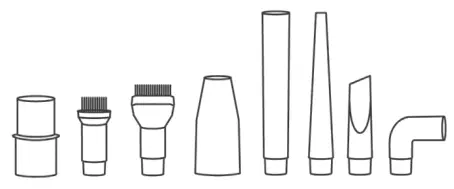
1 2 3 4 5 6 7 8
1 Nozzle adapter (is always plugged onto the suction opening fi rst!) 2 Small round brush 3 Small long brush 4 Adapter for the 8 accessory nozzles (is plugged onto the nozzle adapter!)
5 Small suction tube (2x) 6 Narrow suction tube 7 Small crevice nozzle 8 Small angled nozzle
❐ Keep children and animals away from the packaging material. There is a danger of suffocation!
❐ Before you attach or detach any accessories, ensure that the device is not connected to the mains power. ❐ The nozzle adapter (1) (see the "Items Supplied" chapter, "Accessories" section, "Noz- zle adapter and 8-piece accessory set" point) is always plugged onto the suction open- ing fi rst, regardless of whether you are using one of the three large nozzles (or the extension suction tubes) or the small accessory nozzles! For the small accessory noz- zles, the accessory nozzle adapter (4) is also plugged onto the nozzle adapter (1)!
09294_de-gb-fr-nl_V0.indb 19 09294_de-gb-fr-nl_V0.indb 19 30.10.2014 12:05:44 30.10.2014 12:05:44

Attaching/Detaching the Floor Nozzle, Brush Nozzle and Crevice Nozzle 1. Plug the nozzle adapter onto the suction opening. 2. If you wish, plug the extension suction tubes onto the nozzle adapter. 3. Plug the fl oor nozzle or the brush nozzle or the crevice nozzle onto the extension suction tube.
The nozzles can also be plugged directly onto the adapter without placing the extension suction tubes in between.
Attaching/Detaching the 8-Piece Accessory Set 1. Plug the nozzle adapter onto the suction opening. 2. Plug the accessory nozzle adapter onto the nozzle adapter. 3. Select an accessory nozzle and plug it onto the accessory nozzle adapter. 4. When you want to detach the accessory nozzles, simply pull them off the accessory nozzle adapter.
❐ The openings on the device must not be blocked to ensure that the motor does not overheat or suffer damage. ❐ Never hold the nozzles close to parts of your body or animals during use and do not place your hands inside the nozzles. They could become stuck to the device / injured. Should the vacuum cleaner become stuck, switch the device off immediately. ❐ Switch on the vacuum cleaner only when you have checked that all the parts have been fully attached and that the dust container and the fi lters are correctly inserted. ❐ Always switch the device off fi rst and pull the mains plug from the mains socket be- fore you replace the nozzles and any other accessories! ❐ On no account should the device be used to suck up the following:
– Liquids or wet substances (e.g. wet carpet shampoo) – Glowing ash, cigarette ends, matches, etc. – Infl ammable or explosive substances – Very fi ne dust (e.g. concrete dust), ash or toner – Pointed, hard objects such as large pieces of broken glass
09294_de-gb-fr-nl_V0.indb 20 09294_de-gb-fr-nl_V0.indb 20 30.10.2014 12:05:44 30.10.2014 12:05:44

❐ Always remove the mains plug from the plug socket before removing the dust container. ❐ Never immerse the motor housing in water or other liquids. ❐ Do not use any sharp or abrasive cleaning agents or cleaning pads to clean the de- vice. These could damage the surfaces.
Emptying the Dust Container The dust container should be emptied at regular intervals to maintain good suction force. You can look through the transparent housing to see how much dirt has accumulated inside.
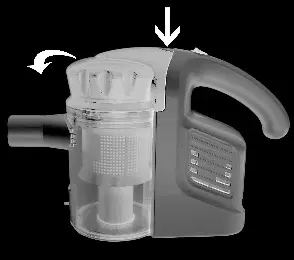
B
2. Hold the dust container over a dustbin or similar outlet. Pull the catch for the bottom of the dust container down- wards. The bottom of the dust container will fl ip open. 3. Then fl ip the bottom of the dust container shut again until the catch correctly locks in place. 4. Insert the dust container back into the motor unit by fi rst hooking the bottom part of the dust container onto the mo- tor unit and then pressing it against the motor unit until the release button for the dust container engages. Cleaning the Filter
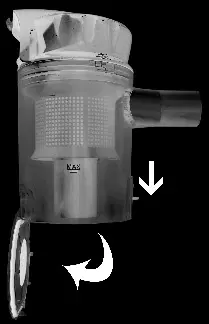
09294_de-gb-fr-nl_V0.indb 21 09294_de-gb-fr-nl_V0.indb 21 30.10.2014 12:05:44 30.10.2014 12:05:44


CAUTION! Under no circumstances should you use a hair dryer to dry the dust container or the plastic dust fi lter. Never reinsert the container and the fi lter if they are still damp! 8. When all parts are fully dry, insert the plastic dust fi lter back into the dust container. 9. Place the fabric fi lter back onto the plastic dust fi lter. 10. Place the dust container lid back onto the dust container and turn it tight. 11. Insert the dust container back into the motor unit by fi rst hooking the bottom part of the dust container onto the motor unit and then pressing it against the motor unit until the release button for the dust container engages.
Storage Store the vacuum cleaner in a cool, dry place out of the reach of children and animals.
09294_de-gb-fr-nl_V0.indb 22 09294_de-gb-fr-nl_V0.indb 22 30.10.2014 12:05:45 30.10.2014 12:05:45

Should your device stop working properly at any time, exhibit signs of damage or require a spare part, please contact the customer service department. For your own safety, do not attempt to carry out repairs yourself. The following table contains tips on how you can remedy small problems yourself.
The device does not work.
The performance is weak.
Dust escapes from the device during cleaning.
During vacuum clean- ing, an unpleasant smell is detected.
Model: GW906-S60 Article number: Z 09294 Voltage supply: 230 V ~ 50 Hz Power: max. 600 W Protection class: II, IP20
The packaging material is recyclable. Please dispose of it in an environmentally friendly manner and take it to a recycling centre.
Dispose of the device in an environmentally friendly manner. It should not be disposed of alongside general household waste. Dispose of it at a recycling centre for used electrical and electronic devices. You can obtain more information from your local authorities.
Customer Service / Importer: DS Produkte GmbH, Am Heisterbusch 1, 19258 Gallin, Germany Tel.: +49 (0)38851-314650 (Calls subject to a charge.) All rights reserved.
09294_de-gb-fr-nl_V0.indb 23 09294_de-gb-fr-nl_V0.indb 23 30.10.2014 12:05:45 30.10.2014 12:05:45
Problem Possible cause/solution/tips
Pagina's waarnaar wordt verwezen in deze handleiding — fabrikant, ondersteuning en downloads.
Veelvoorkomende problemen, mogelijke oorzaken en oplossingen.
| Probleem | Mogelijke oorzaak | Oplossing | |
|---|---|---|---|
| The device does not work. | • Is the plug not inserted in the mains socket correctly? Insert the plug correctly. • Is the plug socket defective? Try another plug socket. • Check the fuse of your mains connection. | p.10 | |
| The performance is weak. | • Is the dust container too full? Empty the container. • Are the dust fi lters heavily clogged? Clean them. • Are the nozzles blocked? Clean the nozzles. | p.10 | |
| Dust escapes from the device during cleaning. | • Is the dust container full? Empty the dust container. • Are the dust fi lters not inserted correctly? Make sure that the plastic dust fi lter is fi tted correctly in the dust container and the fabric fi lter is placed correctly on the plastic dust fi lter. | p.10 | |
| During vacuum clean- ing, an unpleasant smell is detected. | • Is the device being used for the fi rst time? A smell often de- velops when new devices are fi rst used. The smell should disappear after you have used the device several times. | p.10 |
Eigenaren en ons team reageren doorgaans binnen een dag — en uw vraag helpt ook de volgende persoon.
Stel als eerste een vraag — andere eigenaren of ons team geven antwoord.